

How to configure CloudLinux on Dedicated Servers?
Managing multiple websites on the same server can become difficult when one account suddenly starts using too many server resources. A single high-traffic site can slow down every other website hosted on the same server.
That’s why many hosts are now using CloudLinux on a dedicated server. It helps control resource usage and keep websites isolated from each other, which improves overall server stability.
If you manage reseller accounts, business websites, or hosting clients, CloudLinux can simplify server management.
Why CloudLinux Is Useful:
In a normal Linux environment, all users share the same server resources. During traffic spikes, this can create performance issues.
For example:
- One site may consume a high CPU.
- Another account may overload RAM.
- Server load may suddenly increase.
CloudLinux resolves this by assigning separate limits for each hosting account.
That’s why many companies offering dedicated server hosting in India prefer CloudLinux for shared and reseller environments.
What you Need Before installation.
Before installing CloudLinux, ensure:
- Your operating system is supported.
- Root access is available.
- Backups are ready
- WHM or cPanel is installed.
Most administrators use CloudLinux on:
- cPanel servers
- WHM environments
- reseller hosting setups
A properly configured bare metal dedicated server handles CloudLinux very smoothly, as all hardware resources remain dedicated to your environment.
Basic Installation Process:
The setup process is simpler than many beginners expect.
Usually, installation includes:
- Activating the CloudLinux license.
- Running installation commands
- Rebooting the server
- Enabling LVE Manager inside WHM
Once installed, you can control:
- CPU limits
- RAM allocation
- Entry processes
- Disk I/O
- User isolation
This helps keep websites stable even when server traffic increases.
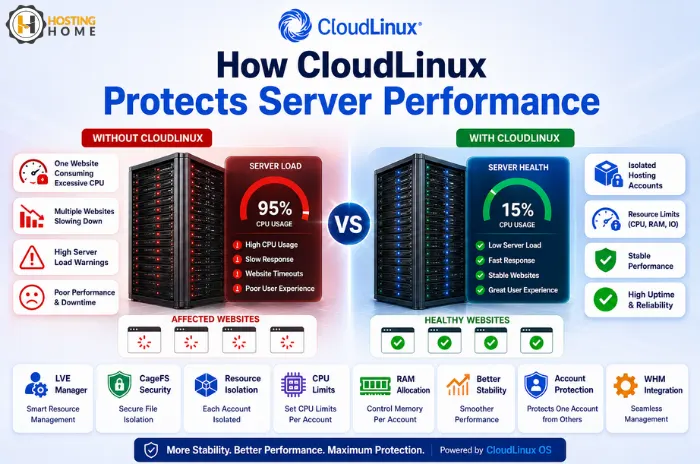
Real Example from Hosting Environments.
Imagine hosting 100 websites on a single server.
Without CloudLinux:
- Any one busy website may slow down the entire server.
- Other customers may experience downtime.
- Support complaints increase
With CloudLinux:
- Each account gets isolated resources.
- Traffic spikes impact only one user.
- Other websites continue running normally.
That’s why many providers using managed dedicated server environments rely on CloudLinux for better stability.
Better Security and Monitoring.
CloudLinux also improves server security.
Features like CageFS separate the users from each other, reducing the risk of one compromised account affecting other websites.
You can also monitor:
- high CPU usage,
- heavy accounts,
- and unusual activity.
For hosting businesses, this visibility helps to avoid random server slowdowns and improve troubleshooting.
Proper Server Configuration Matters.
Installing CloudLinux alone is not enough. The server should also be optimized properly.
Good performance depends on:
- balanced resource limits,
- optimized MySQL settings,
- fast SSD storage,
- and proper CPU allocation.
Even a powerful, cheap dedicated server in India can perform poorly if resource management is not configured correctly.
Choosing the Right Server?
CloudLinux works best on servers with:
- modern processors,
- enough RAM,
- SSD or NVMe storage,
- and stable connectivity.
Before you buy dedicated server hosting, it’s important to think about future traffic growth and hosting requirements as well.
Final Thoughts
CloudLinux helps enhance resource control, stability, and security on hosting servers. It is especially useful for reseller environments, agencies, and businesses managing multiple sites on one machine.
A proper optimization and configuration of the server with CloudLinux can reduce downtime, improve website performance, and make server management easier over time.

Dedicated Server Hosting at Hosting Home.
Hosting Home provides reliable dedicated server hosting solutions for businesses and growing websites in India.
Features include:
- Dedicated server hosting starting at ₹4199.
- Enterprise-grade hardware
- Support for Linux and Windows servers.
- NVMe SSD storage
- Free migration support
- Free DDoS protection
- Free weekly/monthly backups
- High uptime infrastructure
- Quick WhatsApp technical support
Whether you require a business server or a hosting environment, Hosting Home provides scalable server solutions with reliable support and stable performance.